
Benefits Of IT Outsourcing: What You Gain, What To Watch, And How To Choose



Table of Contents
A dispatcher doesn’t care whether a carrier issue, firewall rule, or aging handset caused the problem. They care that a customer call dropped during scheduling and someone has to clean up the handoff. That’s why the benefits of IT outsourcing are getting more attention as the U.S. outsourcing services industry is expected to grow at a CAGR of over 9% from 2025 to 2030, driven by the need to keep support, security, phones, servers, and recovery running without constant internal fire drills.
Alma Trevino, Office Manager at Hardin Technology, notes: “Outsourcing works when support, security, phones, servers, and recovery are managed as one operating rhythm, not as separate emergencies waiting for invoices.”
Benefits Of IT Outsourcing For Day-To-Day Operations
Outsourcing works best when it removes friction from the ordinary workday. That explains why the North America IT services outsourcing market held a revenue share of over 32% in 2024, driven by cost reduction and efficiency needs.
-
Faster ticket movement: When an office manager logs a printer, password, or Microsoft access ticket, clear next steps matter. Our Complete Support Plan includes unlimited onsite and remote support from 8 a.m. to 5 p.m., with limited after-hours coverage for issues that can’t wait.
-
More stable phone days: Managed VoIP support helps reduce dropped calls, routing confusion, and voicemail setup delays that slow dispatchers, schedulers, and customer service teams.
-
Healthier servers and backups: Server checkups, performance monitoring, and 24/7 alerts help catch storage, update, and resource problems before reporting stalls. Backup readiness matters too, especially when a shared file or application has to be restored quickly.
-
Cleaner cost planning: Predictable monthly coverage, included upgrades, replacements, and additions, and no hidden fees or nickel-and-diming make IT easier to budget.
Advantages Of Outsourcing IT Services When Growth Strains The Internal Team
Growth exposes the small gaps people used to work around: old tickets, unclear approvals, phone changes, access permissions, aging servers, and maintenance that happens only when someone remembers. The practical advantages of outsourcing IT services show up when those gaps become managed workflows instead of hallway requests.
-
Help desk becomes consistent
Our all-local support team gives employees a clearer path for everyday issues, from a locked Microsoft account to a scanner that stops sending files to the shared folder. -
Internal teams stay focused
A comparable 65% of organizations outsource to keep internal teams focused on core business, while 53% use partners to fill capability gaps. That matters when invoice approvals need to move and staff shouldn’t be pulled into workstation troubleshooting. -
Specialized projects gain traction
Some organizations buy speed and efficiency at 24%, while 18% seek senior-level expertise for high-impact work. Our Microsoft-certified systems engineers support network upgrades, Microsoft and cloud services, server virtualization, and Dell infrastructure planning. -
Phones and systems align
VoIP changes, call routing, user permissions, and device setup need to match how customers move through your team. A new hire, phone extension, and Microsoft access request shouldn’t become three separate delays. -
Recurring issues get documented
With average remote response under 1 hour and over 95% first-contact resolution, we can spot repeat patterns and reduce recurring IT issues by 50 to 60% after 3 months.
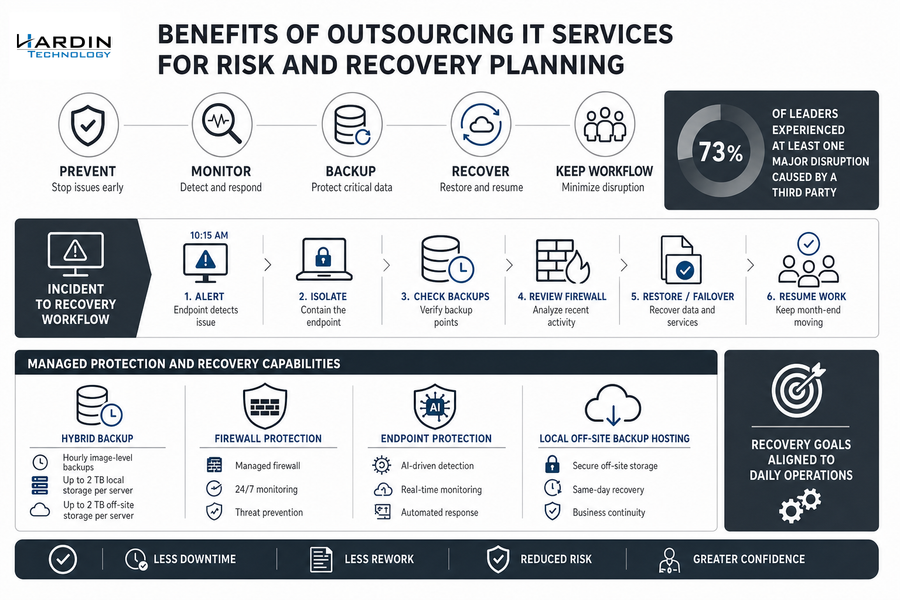
Benefits Of Outsourcing IT Services For Risk And Recovery Planning
A file server outage during invoice processing doesn’t just affect IT. It delays approvals, blocks document access, and leaves the accounting team guessing which spreadsheet version is current. The benefits of outsourcing IT services should include prevention, monitoring, backup, and recovery planning, not just someone to call after work stops.
Picture an endpoint alert on a billing workstation at 10:15 a.m. The user has open invoices, mapped drives, and a shared approval folder tied to month-end close. A good support model isolates the machine, checks backup points, reviews firewall activity, and keeps the workflow moving with the least rework.
Third-party risk also deserves a clear conversation, especially when 73% of leaders experienced at least one major disruption caused by a third party in recent years.
The right plan connects recovery goals to daily operations. Our Complete Support Plan includes managed hybrid backup with hourly image-level backups, up to 2 TB local and 2 TB off-site storage per server, managed firewall protection with 24/7 monitoring, and endpoint protection with AI-driven detection and real-time monitoring.
Local off-site backup hosting also supports same-day recovery when timing matters.
Explore IT Outsourcing Decisions
IT Outsourcing Pros And Cons To Review Before Signing
Changing support models is hard because people are used to specific workflows, escalation paths, vendors, and informal workarounds. A fair review of IT outsourcing pros and cons should look beyond price, even though cost reduction remains the most cited driver at 63%, and it should include third-party risk, since 73% of leaders reported at least one major disruption caused by a third party in recent years. Before committing, walk through the relationship in operational terms.
-
Map daily support paths: Confirm how an employee submits a ticket, who sees it, and what happens when the issue affects a deadline, call queue, or invoice approval.
-
Review response expectations: Our Complete Support Clients receive a response within 4 business hours, with average remote response under 1 hour and onsite support within 4 hours.
-
Check cost boundaries: Ask what’s included, what’s billable, and how upgrades, replacements, and additions are handled so no one gets surprised.
-
Read contract terms closely: If setup fees are discussed, note that no setup fee applies only with signed contracts of 1 year minimum for our Complete Support Plan.
Make IT Outsourcing Work
Know what to gain and what to watch. Hardin Technology helps align support, security, phones, servers, and recovery.
IT Outsourcing Advantages And Disadvantages And How To Choose The Right Fit
The global managed services market reached 401 billion dollars in 2025 and is projected to hit 847 billion by 2033, a 9.9 percent yearly growth rate, but your decision still comes down to daily fit: faster support, fewer recurring issues, safer data access, stable phones, reliable Microsoft systems, and clearer planning for servers, backups, and infrastructure upgrades.
When you weigh IT outsourcing advantages and disadvantages, look for a partner that understands how a help desk ticket, VoIP change, backup restore, or server performance issue affects the person waiting on the next approval or customer handoff.
If you’re reviewing support needs, risk, data access, phones, servers, backups, or infrastructure priorities, contact Hardin Technology and we’ll talk through the practical options with you. Our all-local support team and Microsoft-certified systems engineers have helped businesses manage IT decisions for 25+ years.