
IT Support Tiers: Build Faster, Cleaner IT Help For Daily Operations



Table of Contents
The controller is ready to release vendor payments, but one approval login is stuck. Finance waits while the ticket lands with someone already deep in a server issue. That’s where IT support tiers become more than an internal IT chart.
Clear routing affects response speed, staff productivity, cost control, and continuity. More than 68% of survey respondents reported faster time to resolution for ticketing and incident response with Microsoft Unified, while 75% of customer service reps said they saw their highest ever ticket volume in 2024.
Alma Trevino, Office Manager at Hardin Technology, notes: “Support tiers work best when they match the business impact of the request, so routine fixes move fast and higher-risk issues reach the right expert without delay.”
IT Support Tiers Explained For Everyday Business Operations
Support tiers route each issue to the right skill level quickly, so work doesn’t sit with the wrong person while an employee, invoice, customer order, or deadline waits.
-
Faster help desk routing: Password resets, printer access, Microsoft account issues, and new-user setup go straight to the help desk instead of waiting behind server maintenance or firewall review.
-
Cleaner technical escalation: When a workstation update breaks an application or a shared file path stops syncing, the request moves to engineers with the ticket history intact.
-
Coordinated specialist ownership: Vendor coordination and strategic escalation keep complex problems from bouncing between software providers, internet carriers, and internal staff.
-
Better cost visibility: Plain-English IT support tiers explained through real coverage help you see what’s included, who responds, and how costs behave. Our Complete Support Plan includes onsite and remote support from 8 a.m. to 5 p.m., limited after-hours coverage, and no hidden fees or nickel-and-diming.
What Is The Difference Between Different IT Support Tiers In Real Workflows
The practical answer to what is the difference between different IT support tiers shows up in the path a ticket takes. When routing is clear, routine issues are resolved quickly, and higher-risk problems reach the right specialist. That kind of routing aligns with research showing more than 68% of survey respondents reported faster time to resolution for ticketing and incident response with Microsoft Unified.
A user reports that they can’t access the accounting folder before a check run. Our local help desk confirms the login, resolves the simple access issue, and documents the request. If server-side permissions are involved, our Microsoft-certified systems engineers step in with the ticket history already in view. If the access problem exposes a backup recovery need or firewall warning, our managed hybrid backup or managed firewall specialists take ownership so the business risk doesn’t get separated from the original workflow.
That same routing discipline should guide how you plan support coverage, not just how you close tickets. Help desk coverage, network monitoring, backup recovery, and security response all work better when each issue reaches the right support tier without delay.
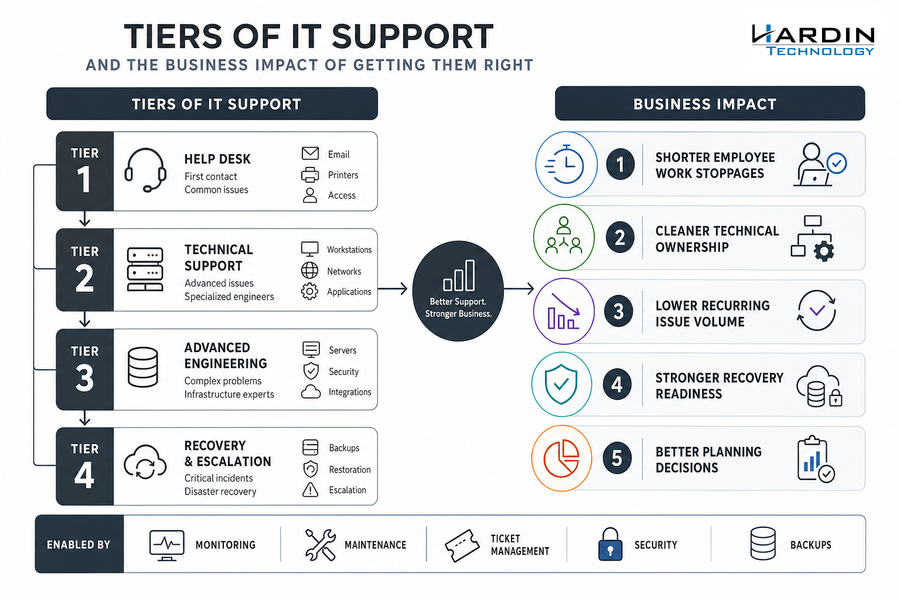
Tiers Of IT Support And The Business Impact Of Getting Them Right
Support tiers give leadership a clearer view of operational maturity, growth readiness, and the technology issues that keep interrupting real work.
-
Shorter employee work stoppages
Common issues move to help desk support first, so a sales rep locked out of email or a billing clerk stuck at a printer gets help without waiting on an engineer. Our remote service requests average under one hour, and over 95% are resolved on first contact. In a Forrester Microsoft Unified study, a composite organization reduced Microsoft product support tickets by 35% and resolved them 30% faster, avoiding 15,750 hours over three years. -
Cleaner technical ownership
Advanced workstation, server, and network issues move to the right engineers instead of circulating among generalists. That matters when a warehouse scanner, VPN connection, or accounting application affects a customer shipment. -
Lower recurring issue volume
The tiers of IT support work best when monitoring and maintenance turn repeat tickets into root-cause fixes. Survey respondents reported a 24% reduction in help desk tickets, and our clients often see recurring IT issues drop 50% to 60% after three months. -
Stronger recovery readiness
Backup tiers, image-level recovery, and off-site protection help restore servers and files faster after deletion, hardware failure, or system disruption. -
Better planning decisions
Ticket patterns show where upgrades, replacements, cloud planning, and budget conversations need to happen before small issues become routine delays. In service environments, 83% of CRM leaders say AI makes it easier for specialists to resolve requests, which reinforces the value of combining clear processes with the right tools.
Explore IT Support Models
IT Technical Support Tiers For Security Backup And Network Reliability
A firewall alert comes in before opening hours, and the first question isn’t who owns the device. The question is whether someone can triage it before staff start logging in and customer calls begin.
-
Endpoint protection coverage: AI-driven detection and real-time monitoring lower risk by flagging suspicious endpoint activity sooner, so a compromised laptop doesn’t sit unnoticed during order entry or scheduling.
-
Firewall monitoring discipline: Managed firewall protection with 24/7 monitoring helps catch threat activity and performance issues before they interrupt work. That matters when a full 56 minutes pass on average before anyone acts on an alert, and when 13% of social engineering incidents were traced back to ignored or untriaged security alerts.
-
Backup recovery confidence: Our managed hybrid backup includes hourly image-level backups, local storage, and off-site storage, with up to 2 TB local and 2 TB off-site storage per server for faster restoration.
-
Server health visibility: Server performance monitoring and 24/7 alerts reduce avoidable downtime during payroll, month-end close, or production scheduling.
Once those risk areas are visible, the next step is choosing a support model that fits how your business actually works.
Streamline Your IT Support Tiers
Hardin Technology helps route routine fixes and complex escalations to the right team so daily operations keep moving.
IT Support Tiers For Choosing The Right Service Model
A controller waiting on invoice approvals, a service manager tracking open tickets, or an operations lead dealing with downtime all feel the cost of IT support decisions long before the monthly bill arrives. Use IT support tiers as a practical lens for that review. Managed services are taking a larger budget role, with spending rising to 18% of IT budgets in 2023, so the decision deserves a practical review.
-
Review recent tickets: Audit the last 60 to 90 days by issue type, system affected, downtime created, and escalation path.
-
Separate support categories: Split routine help desk needs from server, network, backup, security, and cloud management work.
-
Find repeat problems: Identify recurring issues that need root-cause work instead of another quick fix.
-
Confirm response expectations: Define remote support, onsite support, after-hours coverage, and critical incident handling. Our Complete Support Clients receive a response within 4 business hours.
-
Compare real costs: Weigh hourly billing against predictable monthly support when downtime, upgrades, replacements, and additions are part of the real cost.
Build A Support Structure That Keeps Work Moving
Understanding support tiers helps you route tickets faster, reduce repeat issues, protect customer records, and plan technology with more confidence. At Hardin Technology, we combine an all-local help desk, Microsoft-certified systems engineers, managed backup, security, and strategic IT consulting into complete IT outsourcing shaped around daily operations.
If that invoice approval login from the start of the article is the kind of delay your team keeps working around, we can help you build a cleaner support model for help desk support, network support, backup, security, and IT strategy.